The first version of iphone running iOS did not have an Internet parental control feature.
Beginning with iOS 3.0 of the iPhone, however, you can access Internet parental controls by selecting "Settings" -> "General" -> "Restrictions."
Enter a four digit passcode.
On the next screen, select the items you wish to disable on the device.
Tuesday, October 2, 2012

How to close a Web page in iPhone Safari?
Open the iPhone's Safari browser. Press the "Pages" button in the bottom-left corner of the screen. This brings up a screen with each of your open web pages.
Close the Page
Tap the "x" in the upper-left corner of the Web page. This closes the Web page. Repeat the process if you have more than one Web page you want to close.
The same steps work on iPhone, iPad as well as iPods.
Close the Page
Tap the "x" in the upper-left corner of the Web page. This closes the Web page. Repeat the process if you have more than one Web page you want to close.
The same steps work on iPhone, iPad as well as iPods.
Sunday, September 23, 2012
iPhone4 doesn't have Panorama with iOS6
Bad news for iPhone 4 users...
iPhone4 doesn't have panorama option. Only iPhone5 and iPhone4S supports Panorama option in iPhone Camera. Check out the list of features iOS6 supports.
http://support.apple.com/kb/HT5457
iPhone4 doesn't have panorama option. Only iPhone5 and iPhone4S supports Panorama option in iPhone Camera. Check out the list of features iOS6 supports.
| iPhone | iPad | iPod touch | |||||
| iOS 6 feature | 3GS | 4 | 4S | 5 | 2nd generation | 3rd generation | 4th generation |
| Maps: Flyover | ✓ | ✓ | ✓ | ✓ | |||
| Maps: Turn-by-turn1 | ✓ | ✓ | ✓4 | ✓4 | |||
| Siri2 | ✓ | ✓ | ✓ | ||||
| Facebook integration | ✓ | ✓ | ✓ | ✓ | ✓ | ✓ | ✓ |
| Shared Photo Streams | ✓ | ✓ | ✓ | ✓ | ✓ | ✓ | ✓ |
| Passbook | ✓ | ✓ | ✓ | ✓ | ✓ | ||
| Camera: Panorama | ✓ | ✓ | |||||
| Camera: Snap stills while recording | ✓ | ||||||
| FaceTime over cellular3 | ✓ | ✓ | ✓ | ||||
| Phone: Reply/Remind | ✓ | ✓ | ✓ | ✓ | |||
| Do Not Disturb | ✓ | ✓ | ✓ | ✓ | ✓ | ✓ | ✓ |
| Mail VIPs | ✓ | ✓ | ✓ | ✓ | ✓ | ✓ | ✓ |
| Safari: Full screen view | ✓ | ✓ | ✓ | ✓ | ✓ | ||
| Safari: Offline reading list | ✓ | ✓ | ✓ | ✓ | ✓ | ||
| Guided Access | ✓ | ✓ | ✓ | ✓ | ✓ | ✓ | ✓ |
| Made for iPhone hearing aids | ✓ | ✓ | |||||
Notes:
| |||||||
http://support.apple.com/kb/HT5457
Monday, September 10, 2012
How to see battery percentage on iPhone / iPad / iPod
Its sometimes very useful to know the exact remaining battery percentage on your iPhone and iPad or iPod. It helps you better manage your phone usage to preserve the battery and plan better. The battery symbol helps to get an idea about the remaining power storage in your phone, but its difficult to judge the exact remaining power from the battery graph. This is when the percentage count comes handy. Also the best part of this is that it is part of iOS and not any third party app.
To enable this option:
Settings > General > Usage >Battery Usage.
Here turn on the battery Percentage option.

This option can be used to enable ( turn on ) / disable ( turn off ) the remaining battery percentage on your iPhone or iPad.

To enable this option:
Settings > General > Usage >Battery Usage.
Here turn on the battery Percentage option.

This option can be used to enable ( turn on ) / disable ( turn off ) the remaining battery percentage on your iPhone or iPad.
How to create folder in iPad / iPhone / iOS
Its very simple yet very useful option to create a folder on your iOS device including an iPad or an iPhone. This is also applicable on your new iPod.
 Step 1: Tap and hold any app (application) icon on your iPhone or iPad for 2-3 seconds. By this time all the icons starts to jiggle/wiggle.
Step 2: Tap an icon, hold, drag it onto another app icon and release. Both the apps get grouped into a folder.
Step 3: By default a name is given to this folder depending on the category of the containing apps. You can change the folder name as well.

Step 2: Tap an icon, hold, drag it onto another app icon and release. Both the apps get grouped into a folder.
Step 3: By default a name is given to this folder depending on the category of the containing apps. You can change the folder name as well.
Tuesday, August 28, 2012
Best iPhone / iPad / iPod Music Player Alternatives
The iPod Music player that comes along with iPhone and iPad is a great music player. But at times we feel that it lacks many features that we would have wanted in a music player. Some examples that come to my mind are fetching the information about the track and tracking our habits on listening to music. The good thing is there are many alternatives to the iPod music player in the iTunes App Store. Here in this article we will go though some of the most useful and feature rich music app.
Panamp
Panamp is a fast, robust music player application for iPhone and iPod touch that lets you create dynamic “Queues” of your favorite tracks on the go. Find related information about your tracks as you browse through your music library, which is organized in a simple tree view. Responsive and intelligent, Panamp gives you an unprecedented level of control that puts your iOS device at the very center of your musical life. You can download Panamp from the below link: Panamp on iTunes.
iAlbums
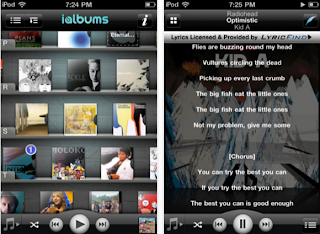 iAlbums lets you experience the story behind your favorite music with bios, reviews, lyrics, photos, videos, interviews and so much more.
There’s a whole world of information just waiting to be revealed behind every music file on your player. iAlbums brings you this world, with a fun and exciting music experience that includes bios, album reviews, tweets, videos, cover versions, photos, and much more.
All of the content is delivered in one seamless flow, all about what you're listening to right now. Whether you’re a Rihanna fan, a Korn fanatic, digging Eminem, a Pink Floyd rocker, a Bjork listener, or anything else in between, let iAlbums introduce you to the musical experience you've been missing. iAlbums can be dowloaded from iTunes.
Music Stats
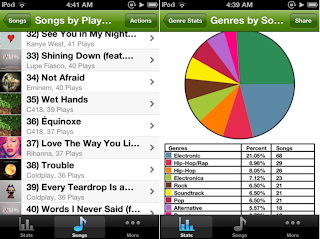
Music Stats is an app that let’s you view stats and details about your iOS music collection and your music listening habits, a must have for any music fan!
Features:
● Sort your songs, albums, or playlists by play count, length, genre, and more
● Detailed stats about each of your songs
● General stats, Fun stats, Averages, and more
● Your listening habits such as most listened to song, genre, or artist, and time spent listening
● Facebook and Email sharing
● Graphs of your Genres and Artists
● Customize the app with Theme Colors
● Play songs from directly within the app
● Auto-play, a feature that automatically picks and plays songs based on a chosen certain criteria (e.g. play songs that you have listened to most or play songs that you have never listened to)
● Favorites, allows you to keep a list of favorite songs
TapTunes
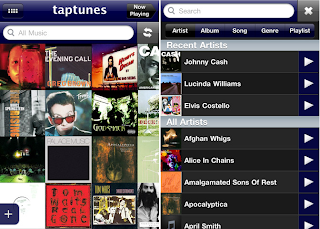
TapTunes is THE advanced music player for the iPhone and iPod Touch. With TapTunes, you will experience your music collection like never before. Touch, tap, drag, pinch, shake, swipe -- you've never been this close to your tunes!
Features:
* BROWSE your music through four unique displays, including all-new STACKED mode
* CONTROL playback through intuitive GESTURES
* SHARE what you're listening to via FACEBOOK and TWITTER
* SEARCH for what you want to listen to, now featuring QUICK PLAY
* SHUFFLE songs or even albums
* CUSTOMIZE your experience through an assortment of settings
XD Music Player
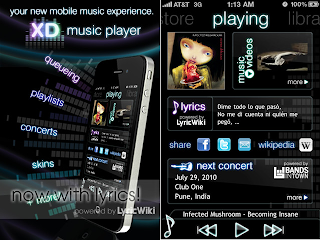 XD Music Player is your new mobile music experience, bringing queueing, playlists, skins, lyrics, concerts, and wikipedia to your fingertips.
• Browse for music within XD, and easily add (or remove) any song, album, artist, genre, podcast, or even audiobook to your "current queue" - and your music never stops! Close the app, and your queue will continue playing.
• If you like your queue, save it as a playlist! You can easily edit and reorder the songs in your playlists anytime.
• Access the lyrics, tour schedule, wikipedia page, and music videos for the artist your listening to right from within XD. Our "now playing" page updates automatically as the song you're listening to changes.
• Find concerts through our recommendation engine, XD Oracle™, or search and filter through them using advanced search.
• XD currently comes with 6 skins - "Liquid Glass", "Blue Steel", "Molly", "Urban Ash", "Zen", and "Black Gold" - with more to come later!
• Share a concert you found or song you're listening to via facebook, twitter, or email right within XD! You can also have XD automatically update your facebook or twitter status to the current song you're listening to.
DJ Mixer
Mix unlimited amount of tracks from your music library on iPad, iPhone and iPod Touch.
Mix, scratch, loop, filter, throw sound effects, record and rock any party with anywhere, anytime.
HOT! Brand new tracks from Marty Party and Hyper Crush, plus hundreds of free music to mix via the free Bander music discovery App.
Also includes free tracks featuring the dancefloor smash hit Vegas by Vandalism & Static Revenger, and additional tracks from The Crystal Method, Bassnectar, Photek, DJ Rap, Kool Keith, Elzhi, and Veze Skante.
No need for expensive and complicated DJ mixing hardware and software.
Panamp
Panamp is a fast, robust music player application for iPhone and iPod touch that lets you create dynamic “Queues” of your favorite tracks on the go. Find related information about your tracks as you browse through your music library, which is organized in a simple tree view. Responsive and intelligent, Panamp gives you an unprecedented level of control that puts your iOS device at the very center of your musical life. You can download Panamp from the below link: Panamp on iTunes.
iAlbums
 iAlbums lets you experience the story behind your favorite music with bios, reviews, lyrics, photos, videos, interviews and so much more.
 There’s a whole world of information just waiting to be revealed behind every music file on your player. iAlbums brings you this world, with a fun and exciting music experience that includes bios, album reviews, tweets, videos, cover versions, photos, and much more.
All of the content is delivered in one seamless flow, all about what you're listening to right now. Whether you’re a Rihanna fan, a Korn fanatic, digging Eminem, a Pink Floyd rocker, a Bjork listener, or anything else in between, let iAlbums introduce you to the musical experience you've been missing. iAlbums can be dowloaded from iTunes.
Music Stats

Music Stats is an app that let’s you view stats and details about your iOS music collection and your music listening habits, a must have for any music fan!
Features:
● Sort your songs, albums, or playlists by play count, length, genre, and more
● Detailed stats about each of your songs
● General stats, Fun stats, Averages, and more
● Your listening habits such as most listened to song, genre, or artist, and time spent listening
● Facebook and Email sharing
● Graphs of your Genres and Artists
● Customize the app with Theme Colors
● Play songs from directly within the app
● Auto-play, a feature that automatically picks and plays songs based on a chosen certain criteria (e.g. play songs that you have listened to most or play songs that you have never listened to)
● Favorites, allows you to keep a list of favorite songs
TapTunes

TapTunes is THE advanced music player for the iPhone and iPod Touch. With TapTunes, you will experience your music collection like never before. Touch, tap, drag, pinch, shake, swipe -- you've never been this close to your tunes!
Features:
* BROWSE your music through four unique displays, including all-new STACKED mode
* CONTROL playback through intuitive GESTURES
* SHARE what you're listening to via FACEBOOK and TWITTER
* SEARCH for what you want to listen to, now featuring QUICK PLAY
* SHUFFLE songs or even albums
* CUSTOMIZE your experience through an assortment of settings
XD Music Player
 XD Music Player is your new mobile music experience, bringing queueing, playlists, skins, lyrics, concerts, and wikipedia to your fingertips.
• Browse for music within XD, and easily add (or remove) any song, album, artist, genre, podcast, or even audiobook to your "current queue" - and your music never stops! Close the app, and your queue will continue playing.
• If you like your queue, save it as a playlist! You can easily edit and reorder the songs in your playlists anytime.
• Access the lyrics, tour schedule, wikipedia page, and music videos for the artist your listening to right from within XD. Our "now playing" page updates automatically as the song you're listening to changes.
• Find concerts through our recommendation engine, XD Oracle™, or search and filter through them using advanced search.
• XD currently comes with 6 skins - "Liquid Glass", "Blue Steel", "Molly", "Urban Ash", "Zen", and "Black Gold" - with more to come later!
• Share a concert you found or song you're listening to via facebook, twitter, or email right within XD! You can also have XD automatically update your facebook or twitter status to the current song you're listening to.
DJ Mixer
Mix unlimited amount of tracks from your music library on iPad, iPhone and iPod Touch.
Mix, scratch, loop, filter, throw sound effects, record and rock any party with anywhere, anytime.
HOT! Brand new tracks from Marty Party and Hyper Crush, plus hundreds of free music to mix via the free Bander music discovery App.
Also includes free tracks featuring the dancefloor smash hit Vegas by Vandalism & Static Revenger, and additional tracks from The Crystal Method, Bassnectar, Photek, DJ Rap, Kool Keith, Elzhi, and Veze Skante.
No need for expensive and complicated DJ mixing hardware and software.
iPhone iPad 4G support in UAE
Apple iPhone 5 would support 4G network. This is a sure factor as new version of iPad 2 already supports 4G Networks. 4G would be 10 times faster than 3G network (around 150mbps speed). In UAE du and Etisalat already suppors 4G network. It was of great disappointment that iPhone4S did not support 4G to the disappointment of iPhone 4S buyers.
In terms of network technology especially mobile technology, UAE is comparable to international standards. New iPad supports 4G LTE (Long Term Evolution) on 700 MHz spectrum. But the new iPhone 5 is supposed to support 4G LTE on 1800 MHz.
 The Dubai based du which is a new entrant to the market when compared to Etisalat which is the pioneer in the field in the region are in good competition in satisfying the customers and rising to international standards in mobile communication technology.
In terms of network technology especially mobile technology, UAE is comparable to international standards. New iPad supports 4G LTE (Long Term Evolution) on 700 MHz spectrum. But the new iPhone 5 is supposed to support 4G LTE on 1800 MHz.

Subscribe to:
Posts (Atom)